

How pimReader Schedules Your Reviews
June 16, 20263 min read
pimReader plans your daily reviews with a modern spaced repetition scheduler. It looks at each card separately, not at one fixed multiplier. Here is how it differs, and what the rating buttons show.
Skip to the guideEvery spaced-repetition system answers one question: when should I see this again?
Get it right and each review comes when you would still recall the item about 9 times in 10: enough forgetting to make the review worth doing, and not so much that you have to learn it again. Missing about one card in ten is normal. It means the schedule is working. Get it wrong one way and you spend hours reviewing things you already know. Get it wrong the other way and you forget material before it comes back.
Many apps answer that question with variations of an algorithm from the 1980s. pimReader uses a modern scheduler that brings each card back when you're likely to start forgetting it. This page explains the difference. (Anki user? See Coming from Anki.)
The old way: one curve for everything
Classic schedulers work roughly like this: get an item right and its interval is multiplied by a fixed factor; get it wrong and it resets. Each card has an "ease" number that drifts up and down.
It works, but it assumes that all your items are forgotten in the same way.
They aren't. A word that is nearly the same in your native language and an irregular verb with four stem changes do not fade at the same rate. With the same multiplier, one is reviewed too often and the other too rarely.
The classic method has another weakness: get a well-known card wrong once and its ease drops so far that it may never recover, so the card keeps coming back more often than it needs to. Anki users call this "ease hell".
The new way: a model per item
pimReader's scheduler takes a different approach. Instead of one multiplier, it models three things for each item:
- Retrievability: how likely you are to recall it right now
- Stability: how slowly it fades once learned
- Difficulty: how hard this item is for you
Every review updates that model. The scheduler then picks an interval that puts your next review at a target probability of recall, which pimReader sets at about 9 in 10. It uses the standard settings and a fixed 90% target: there is no personal optimiser, so the settings are not fitted to your history, and there is no retention setting to change.
In practice: easy items move out of your way faster, and hard ones come back more often.
That should mean less time on cards you clearly know. How much less depends on your material and your ratings; there is no promised number.
What you see
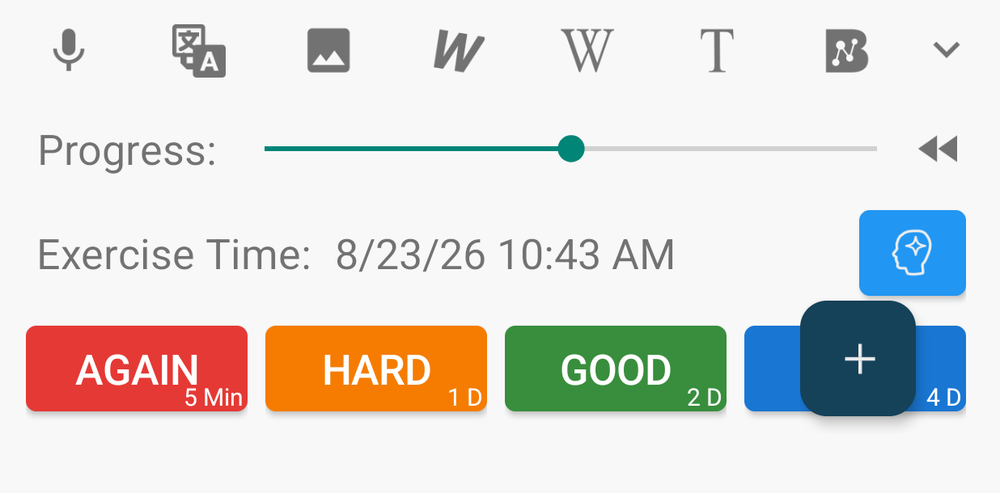
Due cards wait in your daily reviews (the Exercise card on Home). Open one and you get four buttons:
AGAIN · HARD · GOOD · EASY
Each button shows its interval, such as 10 Min or 1 D: what will happen if you press it, worked out for this card and your history with it.
Seeing the result helps you rate carefully, and your ratings decide each card's next date: every rating updates that card's stability and difficulty. The most useful thing you can do for your schedule is to stop pressing "Good" on cards you got wrong.
There is also a progress slider to set a card's state directly, for when you know it is much more or less solid than the schedule assumes.
Do you need to do anything?
No. The modern scheduler is on by default. If you prefer the older fixed intervals, turn off the scheduler switch in Settings. If you have used pimReader for a while, your review counts may shift as the scheduler adjusts to your history.
Only reviews move your dates. Practice sessions don't change your review dates. A spoken review session does: words you get wrong come back sooner.
The one thing that matters most
Whatever scheduler you use, the input is what you tell it.
The modern scheduler models forgetting better than the older methods, but it can only work with the ratings you give it. Press Again when you got it wrong, Hard when you had to think hard, and Easy only when the answer was instant.
The scheduler handles the rest. Reviews and their scheduling are free.