

How to Learn a Language by Reading
September 8, 20264 min read
Reading gives you a language at volume; the cost of every lookup is what stops you. This guide shows how pimReader puts translations above the line and brings back the words you keep.
Skip to the guideReading is the cheapest way to meet a language at volume. A novel gives you tens of thousands of words in context, in an order that holds your attention. For sheer amount of input, a course or a drill app rarely matches it.
What stops most readers is not the reading but the interruptions. Every unknown word means leaving the page, finding a dictionary and finding your place again. Twenty times a page, and you give up.
This guide is about removing that cost, and then making each lookup count for something later.
Read what you would read anyway
Start with material you would choose in your own language: a novel you already like in translation, the news you follow, a blog about your work. pimReader opens EPUB, PDF, MOBI, AZW3, FB2, TXT, HTML and Markdown, and pulls articles from RSS and Atom feeds.
Pick by interest, within reach of your level. Interest carries you through slow chapters, but a text that is far too hard stops you anyway. Graded readers (easy books written for learners) on a topic you like give you both. For a free start, try fairy tales and children's stories under + → Free books. If the material is too hard, the vocabulary tools below will tell you (see Know where you stand).
Unknown words get a translation above them
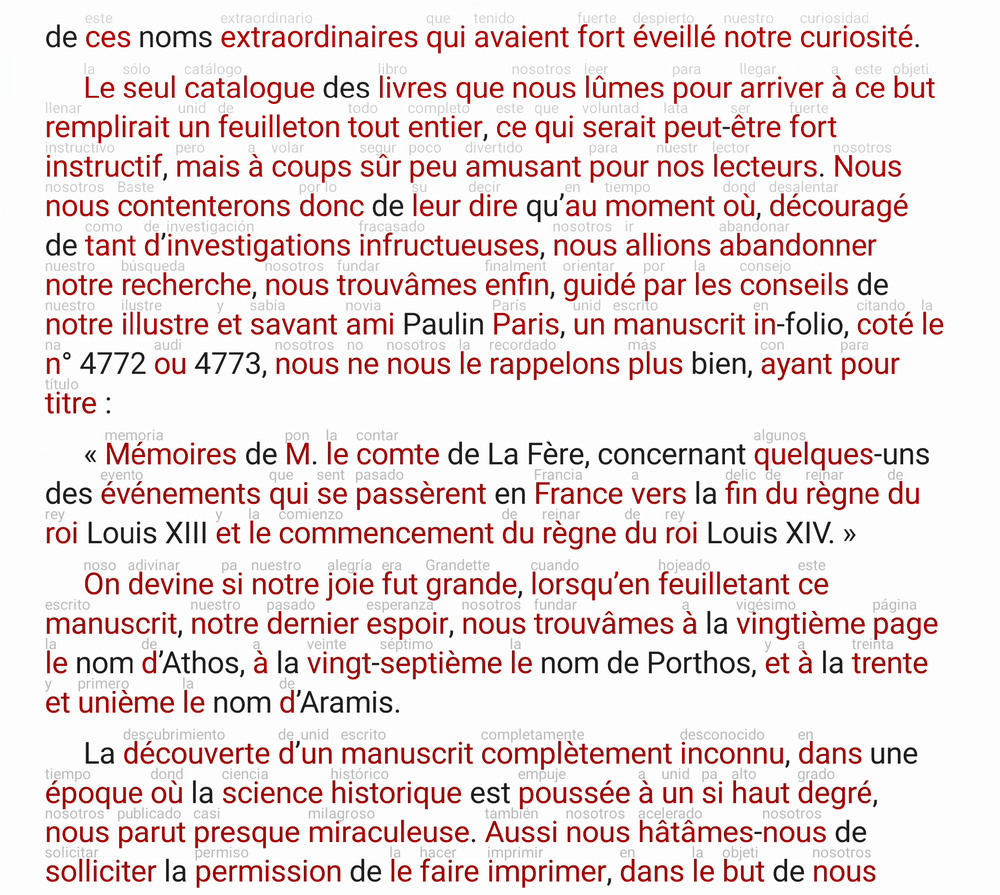
Open the book and read. Words you don't know get a small translation printed directly above them, in the line. You keep reading, and the meaning is there when you need it.
When that short translation is not enough, tap the word. The full dictionary entry opens over the page and closes back to the same place. Select a whole phrase and it is translated as one piece, so an idiom reads as an idiom rather than as its parts.
When the problem is the whole sentence, tap Show Translation: the panel beside the page shows a translation of the passage you are on, and switches back to the dictionary with one tap.
Do not look up everything. Look a word up when you have met it three times, or when the sentence makes no sense without it. Putting up with a little uncertainty is part of the skill, and it is what lets you read at speed.
Know where you stand
pimReader tracks which words you know. At setup a short vocabulary estimate lets you mark the common words you know in one go (it is also in Settings → Languages → Estimate Your Vocabulary). Mark a word as known and it no longer gets a translation above it. After a few weeks the picture is clear: the translated words are the ones you still need, and everything else is yours.
It also estimates your vocabulary size against a frequency list. That answers the question is this material right for me? How many words are coloured depends on the book. For reading a lot, a few per paragraph (about 2–3 per 100 words) is comfortable; graded readers and modern novels often get there, classics often do not. A text for study can have up to one coloured word per line, read slowly and with audio. If almost every line has a coloured word, keep that text for short study sessions and read something easier for volume.
Keep the words worth keeping
When a word is worth remembering, tap it, then tap its translation in the dictionary and tick Memorize. The card is made for you, with the word and its dictionary translation. That is the whole writing step.
Then the schedule takes over. pimReader uses spaced repetition, which brings each card back when you're likely to start forgetting it. Due cards wait in your daily reviews (the Exercise card on Home). Each card has four buttons (Again, Hard, Good, Easy), and each button shows the interval it will set.
Be selective. Adding every unknown word is the classic beginner mistake, and it produces a review queue you will dread. Add a word if it is frequent or if you keep meeting it. Five to ten words from a reading session is plenty. You will meet the rest again if they matter.
Use the words in sentences
Recognising a word on the page is not the same as being able to use it. Tap the Practice card on Home and pick a mode:
- Develop Fluency: example sentences at your level, built from your own words
- Memorize Words: short phrases that help a word stick
- Practice Dialogs: a conversation, line by line, that you take part in
- Exercise (build sentences): short tasks where you write the sentence yourself
The sentences are made from the words you are learning, at a level you set, so the vocabulary from Tuesday's chapter turns up in sentences you might actually say. Ten minutes of this after a reading session turns words you recognise into words you can use. Practice sessions don't change your review dates.
Say them out loud
Speaking is its own skill and only improves by speaking. Speaking practice runs a fully spoken session: it asks, you answer aloud. Unlike text practice, a spoken review session does change your review dates: words you get wrong come back sooner. For the words you keep mispronouncing, pronunciation feedback shows what you were asked to say, what was heard, and the phrase corrected.
Start this in the first week, when you know forty words. It will be short and uncomfortable. If you wait until you "know enough" to speak, you will keep waiting.
A routine that holds
- Read 20–30 minutes a day. Real material, with translations above the line. Look up little.
- Add 5–10 words from what you read. Not more.
- Review 5–10 minutes a day in your daily reviews. It starts at a minute or two and grows as you add words. If it goes over 10 minutes, add fewer new words for a week.
- Practise or speak 10 minutes, twice a week, using the words you added.
That is under four hours a week, and the reading part is what you wanted to do anyway. At that pace the words build up over the months, each one met in context, and the early chapters get easier to read.
Open something you want to read in the language and read the first page with translations on. That is the whole start.
Reading, dictionaries, translations above the line, Memorize and daily reviews are free; Practice, Speaking practice and pronunciation feedback use AI, which is part of pimReader Plus. When you open an AI feature, pimReader offers Try free for a month: no card, no account, nothing renews. Tap Not now to carry on without AI.