

Start a New Language From Zero: Your First Month
October 12, 20265 min read
You know no words yet. What a reading app can and can't do at the very start, and a week-by-week plan for your first month, 20 to 30 minutes a day.
Skip to the guideIn short: at the very start you can't learn only by reading. You need very easy texts that you hear and read many times, the most common words, and some clear explanations. After about a month of 20–30 minutes a day, short simple texts start to make sense.
This works for any language you can learn in pimReader: English, German, Spanish, French, Italian, Polish or Portuguese.
Be honest about the start
If you know no words, a normal page is full of coloured words. Every word has a small translation above it, and you are reading a word list, not a story. That teaches little.
So in the first month you need three things:
- A lot of very easy input. Short texts, read and heard several times. Easy means you get the idea with the help of the translations.
- A core of frequent words. A few hundred of the most common words make up a big part of any everyday text. Learn these first.
- Some clear explanations. How the sounds work, how to say "I am", how questions are made. A beginner textbook, a teacher or an AI course can give you this. Reading alone gives it to you very slowly.
pimReader helps with reading, listening and remembering. On its own, it is not a full beginner course.
Day 1: set up (10 minutes)
- On the first screen, choose the language you want to learn and your own language for translations. Check both before you continue: they must be different.
- The dictionary downloads, then the vocabulary estimate opens (Estimation of Vocabulary). It shows common words, most frequent first, and its own text says to scroll until most of the displayed words are known to you.
- If you know no words yet, do nothing on this screen: leave Word Count at 0 and tap OK. Then every new word on a page gets a colour and a translation, which is what you want now.
- A few sample books are already in your library (Alice's Adventures in Wonderland in English and German, Les Trois Mousquetaires in French). They are classics and too hard for week 1, so ignore them until week 3.
You can run the estimate again later in Settings → Languages → Estimate Your Vocabulary. It gives a word count, not a level like A1.
Week 1: sounds and first words
- Get a structure. Use a beginner textbook, a class, or the AI Mentor. With AI, open Ask AI and write (with your language): "I am a total beginner in Italian. 20 minutes a day. Build me a course for the first month." Review the course and approve it. For each lesson, tap Create lesson book to get a short text, and Create Flashcard for its words.
- Listen while you read. In the text, open ⋮ → Book ..., tick Play Audio: and choose Speech Synthesis. Press play. The app reads one sentence at a time, highlights it and turns the pages. Listen to each text two or three times, and say a few sentences after the voice.
- Keep a few words. Tap a coloured word. The dictionary panel opens at that word. Tap its translation, then tick Memorize on the word's card.
Daily: 10 minutes of the lesson text with audio, 5 minutes of new words (about 7 a day), and from day 2, 5 minutes of reviews.
Target: about 50 words in your daily reviews.
Only 10 minutes a day? Keep the reviews and the listening, add 5 words a day, and give each week two weeks.
The voice is your phone's own voice. It is free, and its quality depends on your phone and the language.
Week 2: make reviews a habit
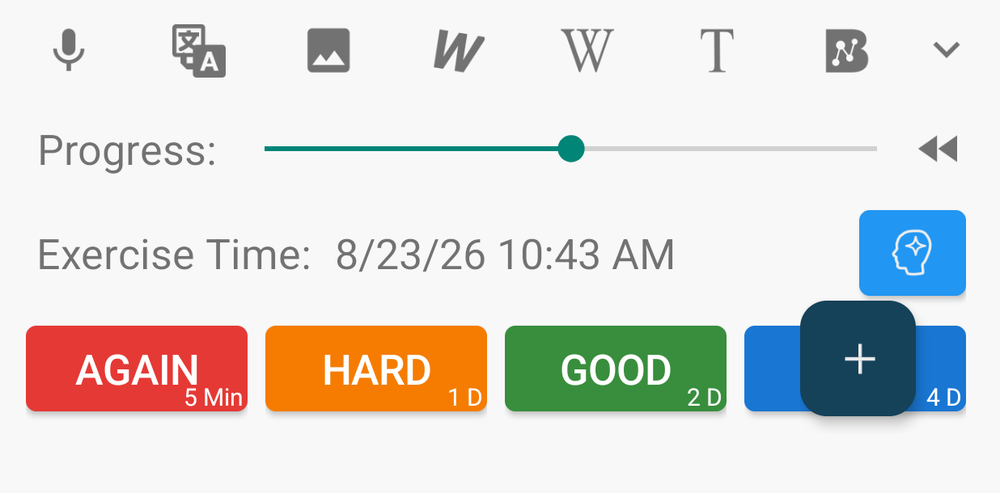
Tap the Exercise card on Home every day, first thing. For each word, tap Again, Hard, Good or Easy. Spaced repetition brings each card back when you're likely to start forgetting it. Be strict: if you hesitated, tap Hard or Again. Once your first cards are scheduled, pimReader asks once on Home, "Get a reminder when cards are ready?" Tap Turn on reminders if you want a daily message. Your phone may then ask permission for notifications and alarms: allow them. Or tap Not now. You can change it later in Settings → Learn schedule.
Add about 10 new words a day, the most common ones (pimReader lets up to 15 new cards a day become ready; you can lower this in Settings → Learn schedule → New cards per day): "go", "want", "today", "because". Skip rare words. If the reviews start to feel heavy, add fewer.
Read each lesson text again the next day. It will feel easier.
Target: about 120 words.
Week 3: your first real short texts
Now try easy texts that were not written for your lesson:
- Graded readers (easy books written for learners) at the first level (often called starter or A1). Buy or borrow them as EPUB or PDF, then open them with Open a file.
- Children's stories. In the library, tap + → Free books, open Project Gutenberg, and look for fairy tales or children's books in your language. They are old, so some words are old too, and some languages have more of them than others.
A text for study now can have up to one coloured word per line, read slowly and with audio. If almost every line has several coloured words, it is too hard. Go back to your lesson texts. That is not failure; the level is just not right yet.
When you know a word, tap it in the panel. It is marked Known and stops being coloured.
Daily: 5 minutes of reviews, 15 minutes of reading with audio, 5 minutes of reading one paragraph out loud.
Target: about 200 words.
Week 4: speak and write a little
- Speak (AI). Select one short paragraph, tap ⋮ → Train speech and read it out loud. You get a pronunciation score from 0 to 100 and tips. Or open Ask AI → Speaking practice for a short spoken review of your due words.
- Write (AI). Write three sentences about your day. Paste them into Ask AI and ask: "Correct this. Explain my mistakes simply, in my own language."
- Ask about grammar (AI) when something surprises you: "Why does this word change its ending here?" The AI can be wrong sometimes, so check important points in your textbook.
No AI? Read your paragraph out loud along with the phone's voice, and ask a teacher or a friend to check your sentences.
Target: about 250–300 words in your daily reviews. Open a lesson text from week 1: it should now feel easy. Fast speech and newspapers are still too hard, and that is normal.
Next steps
- Spanish From Zero: A 12-Week Plan to Your First Easy Novel continues the plan for the next months. It works for all seven languages.
- Your First Novel in a New Language helps when you are ready for a whole book.
- Planning an exam? See the exam guides: English, German, French, Spanish, Italian and Polish.
What it won't do
- It won't teach you from nothing by reading alone. You need easy input and some explanation, as described above.
- It has no graded readers or textbooks built in. You bring them, or use the AI lesson books.
- The vocabulary estimate shows a word count, not an exam level.
- A photo of a page or a scanned PDF has no tappable words.
- AI needs internet. Reading, your dictionary and your reviews work offline.
Reading, the dictionary, translations above the words, read-aloud with your phone's voice and daily reviews (the Exercise card on Home) are free; the AI course, lesson books, Train speech, Speaking practice and writing feedback use AI, which is part of pimReader Plus. When you open an AI feature, pimReader offers Try free for a month: no card, no account, nothing renews. Tap Not now to carry on without AI.