

Speaking Practice Without a Tutor
August 21, 20263 min read
Reading builds vocabulary; speaking is a separate skill. pimReader runs fully spoken sessions on your due words, and words you get wrong come back sooner.
Skip to the guideYou can read a newspaper in a language and still be unable to order a coffee in it.
That does not mean your studying is wrong. Reading trains recognition. Speaking is a different skill, and the only way to build it is to speak.
The usual fix is a tutor, an exchange partner or a class. All good, and all need scheduling, money and a willingness to be bad at something in front of a stranger.
pimReader offers another option: a spoken session, whenever you want, with nobody watching.
What happens in a session
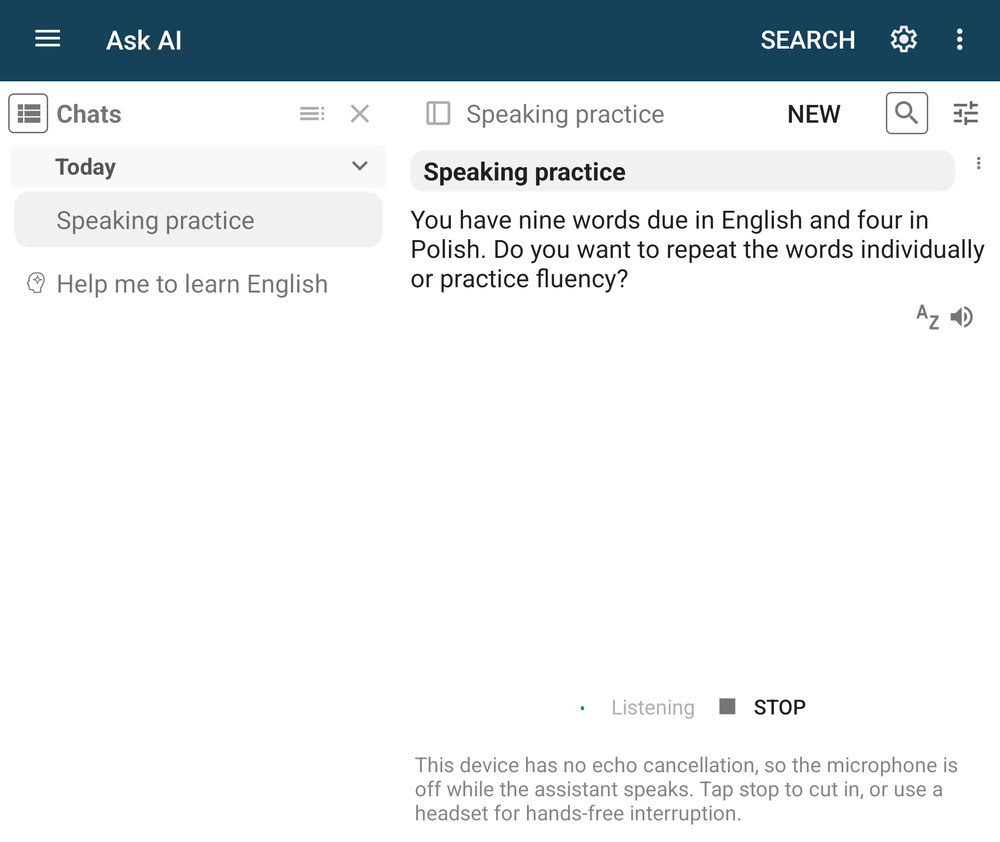
Open Ask AI on Home and tap the Speaking practice tile.
A few seconds later it starts talking. A session can open like this:
"You have nine words due in English and four in Polish. Do you want to repeat the words individually or practice fluency?"
You answer out loud. That is the whole interface.
It already knows which words are due, in which languages. It works from your daily reviews, not from generic material.
From there it quizzes you one word at a time, runs fluency drills, or starts a role play, depending on what you ask for. The screen shows the state (Listening, Thinking…, Speaking), but you don't need to look at it.
Why it counts
A spoken review session changes your review dates. If you get a word wrong out loud, it comes back sooner. If you say it correctly, it moves further out. Your schedule is set by spaced repetition, which brings each card back when you're likely to start forgetting it.
So speaking practice is not a separate activity with separate progress. It is another way to do the reviews you already have. (Text Practice modes are different: practice sessions don't change your review dates.)
A session ends when you go quiet for a while, when it reaches its time limit, or when your AI credits run out. Tap Resume to carry on where you stopped.
Pronunciation feedback, for single phrases
Conversation builds fluency. It does not reliably fix pronunciation, because a conversation partner understands you and moves on.
So there is a second, narrower mode. You are asked to say a specific phrase. You say it, and you get back:
- what you were asked to say
- what was heard
- your phrase, corrected
- how it should sound
- a score
The corrected phrase is the useful part: not just "wrong", but your sentence, fixed. The score lets you compare across weeks.
Talking instead of typing
You can also dictate into the chat instead of typing. Ask the AI Mentor a question out loud, or answer an exercise by speaking. Tick Send when I stop talking and you don't need the keyboard at all.
If the language you are learning uses a script you type slowly, this removes a barrier that has nothing to do with your level.
Practical notes
Tap Stop to cut in. While the assistant is speaking, the microphone may be off, so talking over it does not interrupt it; the app shows a note when this happens. Tap Stop to cut in.
Start with the words you have due. Free conversation is tempting, but for the first few sessions work through due words. It gives the session structure and a clear end.
Keep sessions short. Five to ten minutes of speaking is plenty. It is not a podcast to leave running in the background.
Leave the voice engine on the default. The chat's tune menu lets you pick another engine; try one only if sessions keep failing.
Where it fits
This does not replace a human tutor, who notices you have avoided the past tense for three weeks and says so.
What it replaces is the practice that was not happening at all: the fifteen minutes on a Tuesday when you can't book a person, but you can talk to your phone in the kitchen.
Open a session and answer the first question out loud. That is the whole start.
Speaking practice uses AI, which is part of pimReader Plus. When you open an AI feature, pimReader offers Try free for a month: no card, no account, nothing renews. Tap Not now to carry on without AI.