
Learn from what you read
En un lugar de la Mancha, de cuyo nombre no quiero acordarme, no ha mucho tiempo que vivía un hidalgo.
The word you tap is kept as a card, comes back in a sentence to review, and turns up in a completed course lesson.
pimReader is a reader for books, news and web pages that helps you learn from them. Learning English, German, Spanish, French, Italian, Polish or Portuguese? Words you don't know get a small translation right above them. Studying something else? AI Mentor, your AI tutor, writes lessons and quizzes for any goal.
- Read: ebooks, news, web pages and videos with subtitles, with translations above unknown words. Free.
- Remember: flashcards that come back when you're likely to start forgetting them (spaced repetition), a few minutes a day, also offline. Free.
- Learn with AI Mentor: courses and quizzes for a language or any subject, and speaking practice with a pronunciation score.
Translations and the app itself in dozens of languages, from Arabic to Ukrainian.

Free · no ads · no account · Android
- EPUB · PDF · MOBI · FB2 and more
- 7 languages to learn, dozens for translations
- Works offline
- Your data in your own Google Drive
How it works
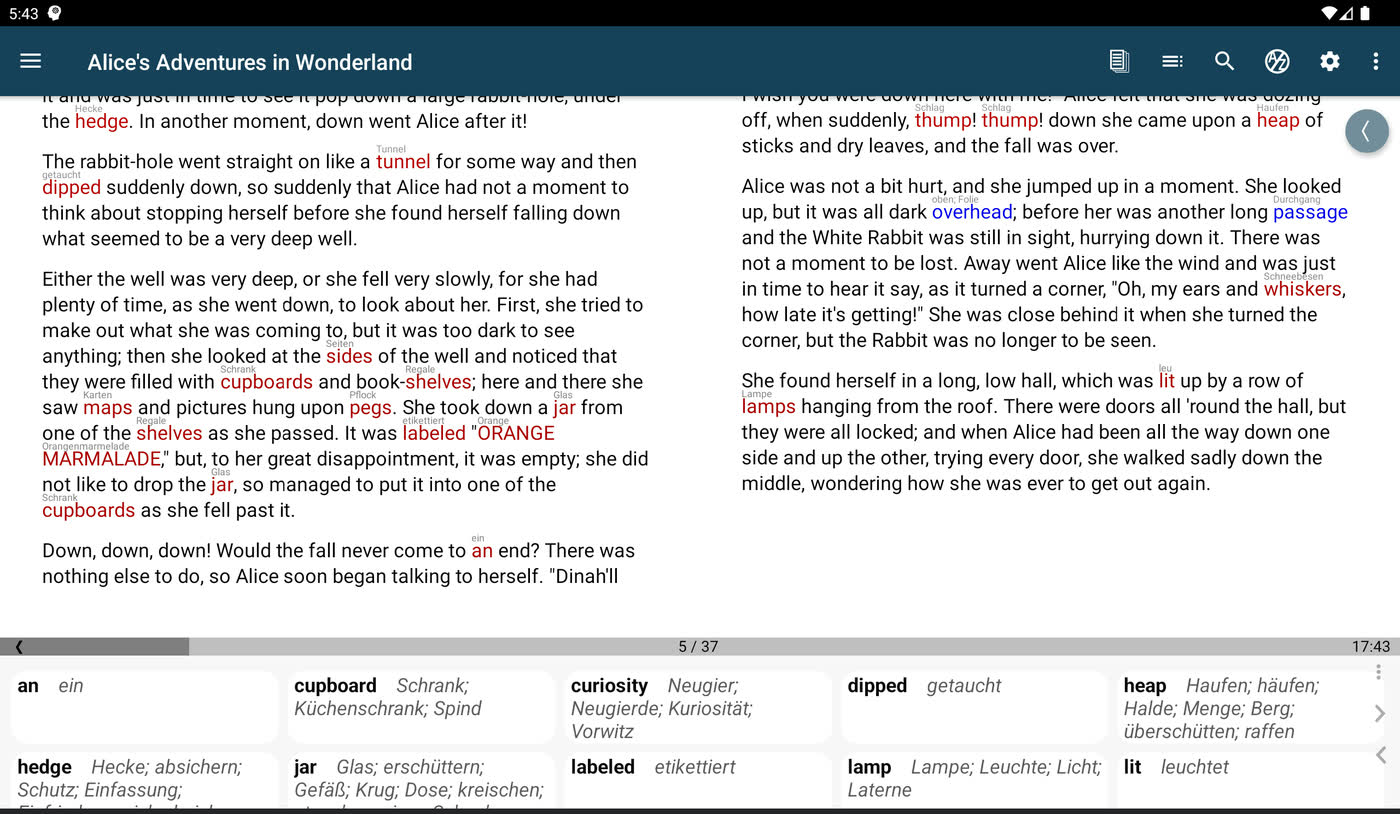
1
Open any book or article
Words you don't know get a small translation right above them, so you keep reading. Tap a word for the full dictionary entry.
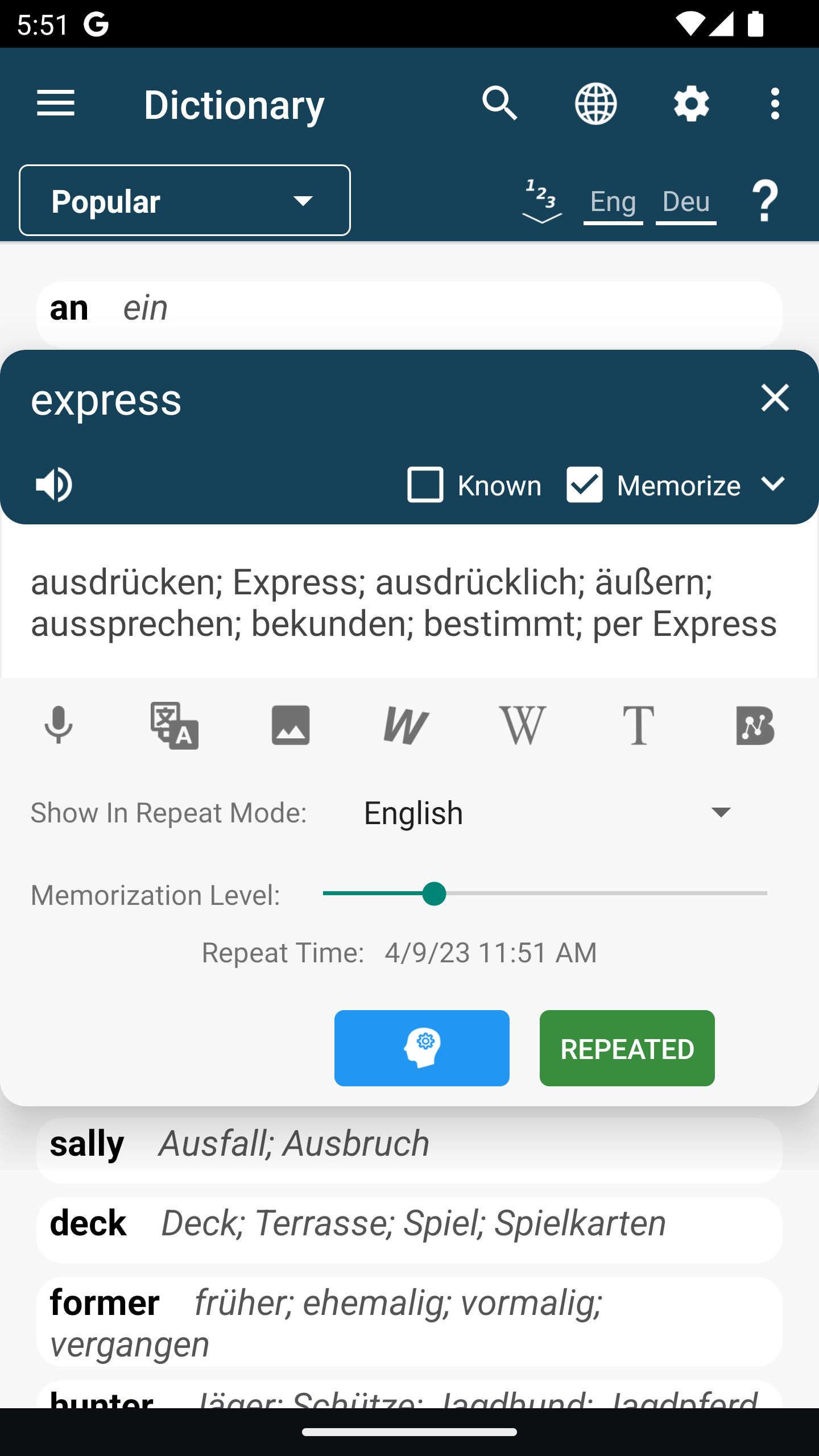
2
Tick Memorize on a word
Tap the word, tap its translation, then tick Memorize. The word becomes a flashcard.
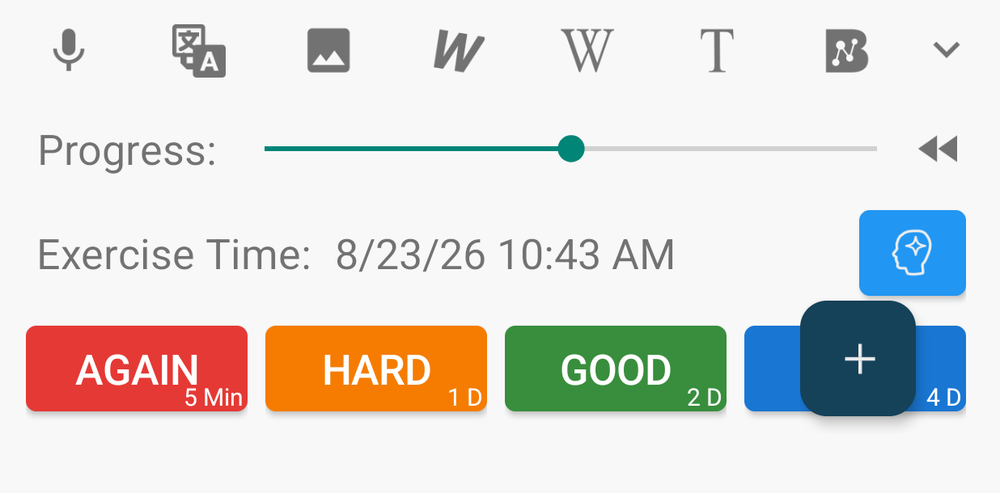
3
Review a few minutes a day
Each card comes back when you're likely to start forgetting it. The answer buttons show the next date before you choose.
Want a tutor?
AI Mentor writes lessons for your goal, and speaking practice scores your pronunciation. The first month is free.
Meet the AI MentorWhere to start
All guidesLearning a language
Studying any subject
Version comparison
When you install pimReader, you get Basic: everything except AI, with no ads, no account, no time limit and nothing to pay. Plus adds the AI features, and the first month is free: no card, nothing renews. After that it is from $5 a month.
| Feature | BasicFree, no time limit | PlusFirst month free, then from $5 a month |
|---|---|---|
| Reading and remembering | ||
| Books, saved web pages and news feeds in one reader | Included | Included |
| Free classic books and a built-in list of news feeds to start with | Included | Included |
| A small translation above words you don't know; tap for the full dictionary | Included | Included |
| Flashcards and daily reviews, timed to when you start to forget | Included | Included |
| Reading aloud with your phone's own voice | Included | Included |
| Films with subtitles in two languages | Included | Included |
| Notes, tags and folders, synced through your own Google Drive | Included | Included |
| AI features | ||
| AI Mentor: lessons, exercises and quizzes for your goal | Not included | Included |
| Speaking practice with a pronunciation score out of 100 | Not included | Included |
| AI practice from your own words | Not included | Included |
| Summaries, answers about any page and AI translation | Not included | Included |
| Search and sort by meaning | Not included | Included |
| Natural AI voices for reading aloud | Not included | Included |
| A monthly amount of AI use | Not included | Included |
Plus price and trial
- Price: Plus starts at $5 a month. Google Play shows the exact price in your currency before you pay.
- Free trial: open any AI feature in the app and tap Try free for a month. You get one month of AI. You do not need a card or a Google Play subscription.
- After the trial: nothing is charged and nothing renews. AI stops until you subscribe, and Basic keeps working. You can use the trial once on each phone or tablet.
- If you subscribe: you pay through Google Play and can cancel there at any time.
- Heavy use: Plus includes a monthly amount of AI use. If you use a lot, you can buy more; nothing extra is charged automatically. What each answer costs depends on the AI model you choose in the chat.
Also included
Listen while you read
Your phone reads the book aloud, highlights each sentence and turns the pages. MP3 audiobooks play beside the book.
Translations only where you need them
Words you already know stop getting a translation. Mark a page's known words at once, or start with a short vocabulary test.
Your feeds and book catalogues
News sites, blogs, Telegram channels and X accounts in the same reader, readable offline. Bring your feed list as an OPML file, and open OPDS book catalogues.
Quick facts
Is it free?
Yes. Basic costs nothing, with no ads and no time limit. It includes reading, dictionaries, flashcards, reviews, feeds, notes and sync. Only the AI features need Plus, a monthly subscription, and you can try them free for one month first. The version comparison above shows what each version includes.
Which devices?
pimReader runs on Android phones and tablets. iPhone, Mac and Windows versions are coming soon.
Do I need an account?
No. Install it and start reading. To use your library on several devices, turn on sync: it keeps your data in a pimReader folder in your own Google Drive.
Does it work offline?
Yes for reading, downloaded dictionaries and your reviews, and articles are saved for offline reading. AI features, feed updates and sync need an internet connection.
Which languages?
You can learn English, German, Spanish, French, Italian, Polish or Portuguese. Translations and the app itself are available in dozens of languages, including Arabic, Chinese, Hindi, Japanese, Turkish and Ukrainian.
Which files can I open?
EPUB, PDF, MOBI and AZW3, FB2, TXT, HTML and Markdown books; MP3 audiobooks, which play beside the book; MP4, MKV and AVI videos with SRT or ASS subtitles. Scanned PDFs without a text layer open, but their words cannot be tapped for translation.
What happens to my text?
Your books stay on your device, and in your own Google Drive if you turn on sync. When you use an AI feature, the text you ask about goes through the pimReader server to the AI provider (OpenAI, or Google for some voice sessions) to produce the answer. The pimReader server keeps your credit balance, not your messages.
Can I use it with a class?
pimReader is a personal app; it has no class or teacher features. A teacher can still recommend a book, but each learner's library, cards and progress stay on their own device.